
Quoted from http://blogs.msdn.com/sharepoint/archive/2009/10/19/sharepoint-2010.aspx:

KnowledgeWave offers this free quick reference guide for Microsoft Excel and other Office Applications. They are packed with instructions and shortcuts. Reference cards are a perfect alternative to bulky reference manuals, this is ideal for anyone who wants to make more efficient use of Microsoft Excel and the other applications.
Tags: Microsoft 365
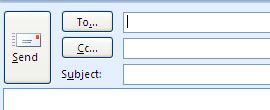
How to show the BCC field in Outlook 2007 Messages
Did your BCC field go away when you upgraded to Microsoft Office Outlook 2007? Want it back?
Tags: Outlook
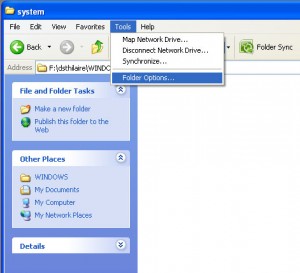
Microsoft Outlook offers a great feature with the Autocomplete. Everytime a new email address is used for the first time, it gets cached and Outlook will highlight the email address the next time you start to type the address. Outlook holds this in a cache file under your user profile on your computer.
Tags: Outlook
Join KnowlegeWave as we host the start of the March 2009 MSDN Northeast Roadshow at our South Burlington, Vermont location on March 10th, 2009.
Help KnowledgeWave welcome Bob Familiar, Jim O’Neil and Chris Bowen as they sweep through various cities, on their eighth series. The Roadshow is a series of free, full day events where they deeply focus on topics for developers and architects, sprinkled with their “unbelievable” senses of humor, demos that usually work, and plenty of giveaways to keep unruly audiences at bay in case they don’t.
To view the full schedule and to register to attend follow the link below:
Tags: Industry News
In Microsoft Office Outlook 2007, you can create and share customized electronic business cards, giving you a personalized way to communicate your information. You can customize your contact information by using electronic business cards that include logos and photos, making contacts more personally relevant and easier to locate.
Here's How:
Tags: Outlook
Team Sites are Microsoft SharePoint's "out of the box" basic intranet team space. In this 60-minute webinar, I'll show you how to design Team Sites so they work effectively for your organization. We'll begin by learning all the "parts," and then I'll show you how to start customizing the content and the environment to suite the needs of your team.
Tags: Microsoft 365
This is a question we concern ourselves with here at KnowledgeWave, because our business depends on the answer. Businesses and organizations of all sizes, from one-person micro-businesses to larger operations which employ hundreds or even thousands of people all need training. How should it best be chosen and delivered? As business itself changes, so does the answer to this question.
You may have heard of Microsoft SharePoint. What is SharePoint? Before I answer that, let me tell you about a growing trend in business: intranets. An intranet is a website that's internal to an organization. People outside the organization don't see or have access to a company's intranet unless they're specifically granted access.
Tags: Microsoft 365
Join KnowledgeWave in welcoming the Microsoft Northeast Roadshow to our South Burlington, Vermont location. The Microsoft Road show will be landing at KnowledgeWave on Tuesday, Septembeer 23rd, 2008. It all starts at 8:30 AM. Don't miss out. Chris Bowen and Jim O'Neil stocked up on munchies, packed in a bunch of giveaways, and are heading out on the open road for their sixth Roadshow! It’s their biggest one yet.
Tags: Industry News

Updated 7/10/2015
Question: Which is better? Answer: It depends. We can’t answer this question for you, but we can offer you some helpful information and our expert opinion. One size does not fit all; each training approach has its own strengths and weaknesses.





