
Recently, I was talking with an organization about Microsoft Copilot when an interesting concern came up.
They had received charges related to AI usage and believed employees were simply using Copilot Chat. Their assumption was that every time someone entered a prompt into Copilot Chat, they were consuming tokens and potentially generating additional charges.
It’s an understandable assumption.
Microsoft now has several experiences carrying the Copilot name. They can appear alongside one another, but they don't necessarily have the same capabilities or the same licensing and billing model.
With Copilot Cowork becoming part of that conversation, understanding the differences has become even more important.
So, let's clear up some of the confusion.
First, Copilot Chat Is Not Copilot Cowork
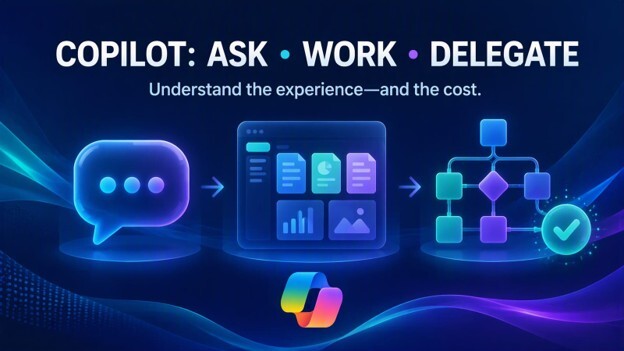
One of the easiest ways to understand Microsoft's different Copilot experiences is to think about what you're asking AI to do.
Copilot Chat: Ask
Microsoft Copilot Chat is the baseline secure AI chat experience available to eligible Microsoft 365 users. Microsoft describes it as being included with eligible Microsoft 365 licensing, rather than requiring the Microsoft 365 Copilot add-on license.
You might use Copilot Chat to:
- Ask a question
- Brainstorm ideas
- Draft some content
- Analyze information you provide
- Upload a file and ask questions about it
- Research a topic
This is the Copilot experience many employees are already familiar with. Here's the important point: using standard Copilot Chat is not the same thing as running a Copilot Cowork task that consumes Copilot Credits. There are exceptions once you start adding certain agents and other capabilities, which I'll come back to.
Microsoft 365 Copilot: Work
Microsoft 365 Copilot builds on Copilot Chat with additional capabilities for users who have the Microsoft 365 Copilot add-on license. That includes work-based grounding and Copilot experiences integrated into applications such as Word, Excel, Outlook, and Teams. Licensed Copilot users can also leverage the core applications in Copilot Chat, a new experience for licensed users.
Instead of simply asking AI a question, users can bring Copilot into the applications and information they use throughout their workday.
Think about the difference this way:
Copilot Chat helps you ask.
Microsoft 365 Copilot helps you work.
But now Microsoft has introduced another experience.
Copilot Cowork: Delegate
This is where things become particularly interesting.
Copilot Cowork goes beyond having a conversation with AI. Microsoft describes Cowork as an experience that can carry out tasks on your behalf of a user across Microsoft 365.
For example, Microsoft says Cowork can create documents, send emails, schedule meetings, post messages in Teams, manage files, research information, prepare briefings, and even run scheduled prompts. Users can see the steps Cowork is taking, and Microsoft says users approve actions before they happen.
That's an important distinction.
With traditional Copilot, you are typically asking AI to help you accomplish something. With Cowork, you may be asking AI to take on a task and carry it through multiple steps.
A simple way to remember it is:
Copilot Chat: Ask.
Microsoft 365 Copilot: Work.
Copilot Cowork: Delegate.
And that last category introduces another consideration for organizations: consumption.
Learn More: Role-based Copilot Training
Wait, Am I Paying Every Time Someone Uses Copilot Chat?
This is one of the biggest areas of confusion right now. The simple answer is no, not just because someone entered a prompt into standard Copilot Chat.
Microsoft Copilot Chat is included for eligible Microsoft 365 users. It doesn't suddenly become pay-as-you-go simply because an employee asks another question.
But there is an important distinction.
Some agents available through Copilot Chat can involve metered consumption. Microsoft says agents grounded in instructions and public websites can be available at no additional cost, while agents accessing shared organizational data, such as SharePoint or Graph Connector content, can be billed based on metered consumption for Copilot Chat users. Microsoft also states that these metered agents are off by default for Copilot Chat users and require administrators to establish billing to enable them.
That nuance matters. So rather than thinking: "Copilot Chat uses tokens."
A better question is: "Which Copilot experience am I using, and has my organization enabled something that uses consumption-based billing?"
Copilot Cowork and Copilot Credits
Copilot Cowork introduces a different model.
Microsoft measures Cowork tasks using Copilot Credits. The number of credits consumed by a task can vary based on factors such as the AI models being used, the amount of context retrieved, the runtime required to complete the task, and the tools Cowork calls along the way. A little confusing right?
In other words, this isn't necessarily a simple "one prompt equals one credit" calculation. That's why organizations should think about Cowork differently from standard AI chat.
Microsoft supports usage-based billing for Copilot Credits and provides cost management capabilities in the Microsoft 365 admin center. Administrators can use these controls to manage spending policies and monitor consumption. And that's a conversation business leaders and IT departments should have before Cowork is widely adopted. Read about the Leadership Phase of our AI Enablement Framework.
Pay As You Go Doesn't Have to Mean "Open Checkbook"
The phrase "pay as you go" can make business leaders nervous, especially when we're talking about AI. Nobody wants to discover at the end of the month that a new technology generated a bill nobody expected.
Fortunately, Microsoft's current Copilot Cost Management experience includes controls for managing Copilot Credit spending. Administrators can create spending policies, set limits and alerts, select billing methods, and monitor consumption.
That means adopting an AI experience such as Cowork doesn't have to mean giving everyone unrestricted access to consumption. In fact, I'd recommend doing exactly the opposite.
Start With a Cowork Pilot
Rather than introducing Cowork broadly across an organization, start small.
Identify a group of employees who have good reasons to experiment with delegating multi-step tasks to AI.
You might begin with a small cross-functional group representing areas such as operations, sales, marketing, HR, finance, or IT. Set a budget for the pilot, identify several real business scenarios, and monitor how Cowork gets used.
The important question isn't simply: "How many Copilot Credits did we use?"
It's: "What did we accomplish with those credits?"
If Cowork completes a multi-step task that otherwise would have taken an employee significant time, the conversation shouldn't only be about the number of credits consumed. It should also be about the value of the work completed.
That's how organizations can begin determining where an agentic AI experience makes sense.
Put Some Guardrails Around the Experiment
One lesson we've learned repeatedly with Microsoft 365 is that governance conversations are much easier before broad adoption than after it. Cowork should be no different. Before expanding access, business and IT leaders should agree on a few basic questions:
- Who should have access to Cowork?
- Which business scenarios are we trying to improve?
- How much are we willing to spend each month while we evaluate it?
- Who is responsible for reviewing consumption?
- What would make the pilot successful enough to expand it?
There is also a technical setting worth knowing about.
Microsoft says Cost Management spending policies have an Auto-apply new services setting that is enabled by default. Administrators can turn that setting off if they want future supported Copilot services and agents to be reviewed before they're added to the spending policy.
You don't need to be a Microsoft 365 administrator to understand why that matters.
If your organization wants deliberate control over which usage-based AI experiences are available, someone should be reviewing those settings. We'll dig deeper into those administration and governance controls in a follow-up post specifically for Microsoft 365 administrators.
Want to Know What a Cowork Task Used? Ask It.
Microsoft has also built a helpful cost-awareness feature directly into Cowork. Type: /cost and Cowork provides an approximation of the Copilot Credits consumed by the open task, along with information about how many credits you've used and how much of your monthly limit remains. Microsoft says using /cost does not itself consume Copilot Credits.
That's a small feature, but I think it's an important one. If we're going to ask employees to think responsibly about AI consumption, they need visibility into that consumption.
The Bigger Picture: Copilot Isn't One Thing Anymore
For business leaders, this may be the most important takeaway. When someone says, "We're using Copilot," that description is no longer specific enough.
Are employees using Copilot Chat?
Do they have Microsoft 365 Copilot licenses?
Are they using agents?
Has your organization enabled usage-based AI services?
Are people starting to use Copilot Cowork to carry out more complex tasks?
Those experiences may all involve "Copilot," but they aren't interchangeable, and they don't necessarily follow the same licensing or consumption model. Microsoft specifically distinguishes between fixed subscription licensing and usage-based services measured through Copilot Credits.
That doesn't make Cowork something organizations should be afraid of.
Actually, I think it's a reason to pay attention to it.
We're moving from AI that primarily answers questions and generates content toward AI that can take on work and carry out tasks.
That's a significant shift.
It also means organizations need to think differently about how they introduce these tools.
Start with a defined group. Put spending controls in place. Give people real scenarios to explore. Watch the consumption. Measure the results. Then decide where expanding access makes sense.
And perhaps most importantly, don't assume that every product with "Copilot" in its name works, or gets billed, the same way.
Copilot Chat helps you ask.
Microsoft 365 Copilot helps you work.
Copilot Cowork lets you delegate.
Understanding that difference is a good first step toward using each one responsibly.
Have questions about which Microsoft Copilot experience makes sense for your organization? KnowledgeWave helps organizations understand Copilot licensing, prepare users for AI, establish adoption strategies, and build the skills employees need to use Microsoft 365 Copilot effectively.
Learn more about our 6 Step AI Enablement Framework





