This is a popular topic these days. This class has been just added and confirmed to run with live IN-HOUSE instruction. This topic while popular does not run in-house on a regular basis. Often times SharePoint training is done in closed corporate environment to meet the specific needs of our clients. This open enrollment class offers a low cost opportunity to get your key staff members up to speed with all the new user features exposed in SharePoint 2010.


As August rolls in and the summer season is strong upon us, KnowledgeWave wanted to provide you with an opportunity to take your training well into the Fall Season.
Now though the end of August register and pay full price for any Level 1 and Level 2 class and we’ll include a Level 3 class at no charge*! Or if you prefer your training on the go, Pay for a 3-pack of classes at list price and we’ll send you a Google Nexus7 Tablet or Kindle Free completely free*! We’ll even include a free month of our Log on to Learn service, so that you can learn what you need, when and where you want through the rest of the summer season.
The fine print:
*You cannot combine offers. For new registrations only. First two classes must be paid in advance at a list rate of $239 each. Classes do not need to be attended in August, but do need to be attended by December 31, 2012. Nexus or Kindle offer is for basic tablet and requires advance payment for 3 desktop classes valued at a minimum of $239 each. Free month of Log on to Learn will rebill at a monthly rate of $59/month unless cancelled before renewal date. You can cancel recurring service at any time.
Tags: KnowledgeWave News
KnowledgeWave is seeking a full or part-time desktop applications instructor with experience in Microsoft Office to enthusiastically share knowledge in training seminars to both corporate clients and individuals. The ideal candidate has a true passion for training and a desire to teach. He/she must have a strong understanding of technical concepts and be able to effectively communicate. Some travel is required.
Tags: KnowledgeWave News

This month's lunch bite sessions include two events for Microsoft Excel and Two Events for Microsoft Outlook. They are being held on Wednesday, June 20, 2012. Simply click the register links and regiser online. All events are completly free!
Tags: Webinars
Distance learning has evolved from a small offering of correspondence courses to entire universities offering complete degree programs online. Modern online degree programs continue to evolve at a rapid pace and offer a variety of students the opportunity to receive a college education and career training. Now, students don’t have to decide between on-campus or online learning, because some schools are offering hybrid programs which include both in-class and online instruction.
Tags: Industry News
KLS ( the KnowledgeWave Learning Site) is an online learning portal that provides continuous learning on popular business software for business users. With over 1,200 video tutorials and more added on a regular basis, often times based on member requests, Log on to Learn is the most affordable and comprehensive training platform on the web for the Microsoft Office.
Tags: KnowledgeWave News

Microsoft Excel is a wellspring of useful features for so many different purposes. That's why this month we're having an Excel-ent lunch with our Lunch Bites series. Two of this month's topics will focus on varying aspects of Excel. The first will look at Excel charts while the second will look at headers, footers and printing options. Let's be honest, we've all been flustered by the printing appearance of our spreadsheets in Excel.
These free sessions are just 15 minutes of your time, but will reward you with great time-saving tips and tricks that will save you hours. Come for one, sign up for both, it's up to you. Just don't miss them!
Tags: Webinars
Fridays just feel like a day for rewards. It’s the end of the week, we’ve put in a good effort and we’re looking ahead to the weekend. Well, we’d like to give you something else on Fridays. That’s why we’re introducing, Function Fridays. Every Friday we’re going to post a new video tip on an Excel function… for free. These short tutorials get right at the heart of how to use the functions that can make your Excel life easier. Now, that sounds perfect for a Friday.
Tags: Excel
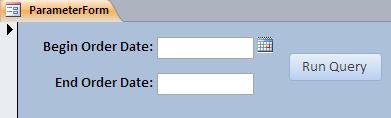
Date ranges are a very common filter that database users want to implement in their queries. For example, let’s say your company sells office supplies and your databases tracks customer orders. You want to run a monthly query that summarizes total orders.
Tags: Access
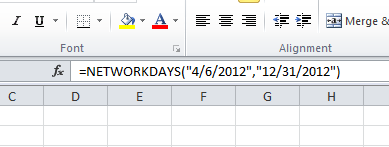
Calculating the number of workdays between two distinct dates can be a pain to do, manually. However, Excel has a great function that will help you accomplish this. It involves using the NETWORKDAYS function.
Tags: Excel
For the past few years we've brought quality training to your desktop through 30 minute and 60 minute webinars. Every month we offer free sessions on topics of interest to most users. Well, we're going to keep on doing that. However, we're mixing up the format to meet the needs of our customers, wherever they are.
Tags: Webinars
Microsoft Outlook does many things that save time and streamline our communications process. In fact, it’s hard to remember how we business communications worked before the days of email. Each time you correspond with a new person, Outlook stores this address for quick recall at a later time. This is a good thing. We’ve all used this. You start typing an address and one, or several, options appear for us to select.
Tags: Outlook
Read More ›
Tags: Windows