Picture this common scenario: An organization buys 300 Copilot licenses. IT assigns them on a Thursday. There is an announcement email, maybe a lunch-and-learn. Six weeks later somebody in finance asks what the licenses are costing and if they are seeing any ROI, and nobody has a good answer, because usage has quietly settled at a fraction of what was purchased
We have watched versions of this play out enough times to stop seeing it as simple bad luck. The licenses were never the problem. What was missing was everything around them.
That is why we built the KnowledgeWave AI Enablement Framework, a six-phase program that covers Microsoft Copilot AI adoption from the first leadership conversation through to actual changes in work efforts and outputs. The map of our framework is now live on our website in full, as well as a deeper-dive page for each phase.
What the Six Phases Cover
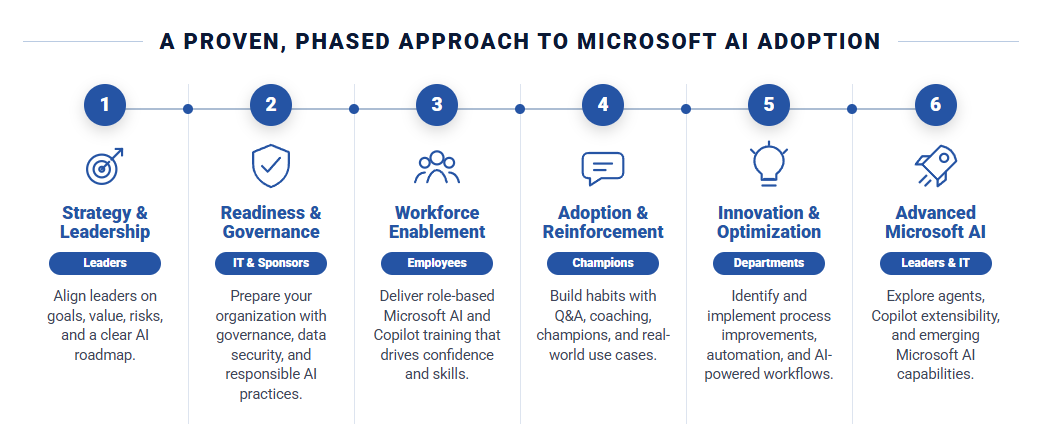
The order matters. Each phase depends on the one before it, and skipping ahead is how programs end up back at that six-week conversation. You don't have to engage with KnowledgeWave at each phase, but you do need to be going through the phases for successful implementation and adoption of Microsoft AI and Copilot.
Phase 1: Strategy and Leadership — Before licenses go out, your leadership team needs one shared answer to three questions: where Microsoft AI creates value for your organization, what risk you are willing to carry, and how ownership is settled across the leadership group. Not a wish list. An agreement everyone in the room can repeat afterward.
Phase 2: Readiness and Governance — Copilot inherits your existing permissions, including the ones nobody has reviewed in years. Oversharing is the risk that surfaces first, and the hardest one to gauge from inside your own tenant. In one client environment, our assessment turned up tens of thousands of active sharing links exposing well over a hundred thousand files. This phase finds what is actually there — real links, real files, not an estimate — then produces a remediation plan scoped to the findings.
Phase 3: Workforce Enablement — AI end user training that starts with foundations, moves through the Microsoft 365 applications people already use, and then goes role-based. The distinction that matters is not app-based training versus role-based; it is tailored training versus stock. At every level, the best examples should come from your workflows and your culture, not a generic demo deck. And it recurs, because people join, roles change, and Microsoft ships something new every month.

Phase 4: Adoption and Reinforcement — Usage spikes after training and then slides. This phase is the follow-through: a champions network equipped to help their peers, recurring open Q&A where people bring their own work, and coaching aimed at the teams that have gone quiet. Some questions that come up need real research or workflow building behind them. When that happens we define the work and agree on it before anything starts, rather than surprising you later.
Phase 5: Innovation and Optimization — Once people are comfortable, the question changes from how do I use this to what should we stop doing by hand. This is project work, department by department: mapping where time actually goes, prioritizing by effort against payoff, and rebuilding routine processes with Microsoft AI, Power Automate and Copilot Studio. Like Phase 2, discovery is scopeable and gets quoted up front; what gets built depends on what discovery finds, and is quoted afterward.
Phase 6: Advanced Microsoft AI — For organizations ready to go past out-of-the-box Copilot. We do not build agents for you. We deliver the official Microsoft technical courses — including Design and Build Integrated AI Agent Solutions in Copilot Studio — so your own team owns the capability, with the tenant readiness and guardrails to build on it safely.
Three Outcomes
Clients do not buy phases. They buy outcomes, and the framework is organized around three:
-
Accelerate adoption, so the licenses you are already paying for get used.
-
Reduce risk, so a rollout does not turn into an oversharing incident.
-
Increase business value, so you can show what the investment returned using reporting already sitting in your Microsoft 365 tenant.
What This Looks Like Over Time
A regional bank in New England has partnered with us for more than five years. Roughly 135 of their people are enrolled, with over 350 attendances across live webinars, and their training membership returned 7.2 times the value of what it cost. Their project lead put it plainly: "Exactly what we needed to help our teams adopt Copilot thoughtfully and securely."
A global trading and investment enterprise has been with us over seven years, across five countries, with more than 75 custom webinars built for their teams and over a thousand live webinar attendances and counting.
Neither of those relationships came from a training week. They came from delivering digestible, up-to-date, learning opportunities over time for all impacted employees.
Where to Start
Every engagement starts the same way — a conversation about where you are today and where you envision yourselves in the future. Some organizations need Phase 1 because leadership has not aligned. Others have alignment and a governance problem. A few are already trained and want to know what to automate next.
Start with the framework overview, or talk to our team and we will tell you honestly which phase you belong in. Even if the answer is that you are not ready for us yet. Call us today, 1-800-831-8449.